
Astro Starlight Setup & Deployment Guide
This tutorial guides you through building a high-performance, multilingual documentation website using Astro and Starlight, and deploying it to Vercel. By the end, you will have a production-grade documentation portal with interactive navigation, automated image optimization, Pagefind offline search, and continuous global deployment.
Principles Followed in This Guide
Section titled “Principles Followed in This Guide”As outlined in our technical writing standards:
- No skipped steps: Every command, file creation, and configuration line is explicitly provided.
- Context first: Technical terms and architectural rationale are explained before executing commands.
- Show, don’t just tell: Complete, functional configuration files are included rather than incomplete snippets.
- Reproducible and verified: All instructions directly reflect the tested, live setup running this exact documentation site.
Prerequisites
Section titled “Prerequisites”Before starting, ensure you have the following ready on your system:
- Node.js: Version 20.x or higher installed (
node -v) - Package Manager: npm (version 10.x or higher) or pnpm
- Vercel Account: A free account at vercel.com
- Vercel CLI: Accessible via
npx vercelor globally installed (npm install -g vercel) - Terminal Access: A Linux (Debian/Ubuntu), macOS, or Windows WSL2 shell
- Text Editor: VS Code, Cursor, Nano, or your preferred code editor
Terminology & Placeholders
Section titled “Terminology & Placeholders”Throughout this guide, the following placeholders are used:
| Placeholder | Meaning | Example |
|---|---|---|
<project_name> |
The directory and name of your documentation project | antigravity-docs |
<production_url> |
The live production URL assigned by Vercel | https://antigravity-docs-teal.vercel.app |
<locale_code> |
Two-letter ISO language identifier | sl, en, hr |
<github_repo_url> |
URL of your GitHub or Forgejo repository | https://github.com/google-gemini |
Step 1 - Project Scaffolding
Section titled “Step 1 - Project Scaffolding”We will scaffold a fresh Astro project using the official Starlight template. To ensure automated scripts and agentic environments run smoothly without blocking on interactive prompts, we pass non-interactive flags.
Run the following command in your terminal:
npm create astro@latest antigravity-docs -- \ --template starlight \ --yes \ --install \ --no-git \ --typescript strictExplanation of flags:
Section titled “Explanation of flags:”--template starlight: Initializes the project with the official Starlight documentation theme and plugins.--yes: Accepts all recommended defaults automatically without prompting.--install: Runsnpm installimmediately to download all core dependencies.--no-git: Prevents initializing an empty git repository if you already maintain a parent repository.--typescript strict: Enables strict TypeScript typing for rock-solid type safety in content loaders and configs.
Navigate into the newly created project directory:
cd antigravity-docsStep 2 - Installing Production Dependencies
Section titled “Step 2 - Installing Production Dependencies”In addition to core Starlight, we install Sharp. Astro uses Sharp for high-speed image processing, responsive image generation, and modern .webp conversion at build time.
Install Sharp:
npm install sharpComplete package.json
Section titled “Complete package.json”Verify that your package.json contains the necessary build scripts and dependencies:
{ "name": "antigravity-docs", "type": "module", "version": "0.0.1", "scripts": { "dev": "astro dev", "start": "astro dev", "build": "astro build", "preview": "astro preview", "astro": "astro" }, "dependencies": { "@astrojs/starlight": "^0.42.2", "astro": "^5.0.0", "sharp": "^0.35.3" }}Step 3 - Content Collection Setup (src/content.config.ts)
Section titled “Step 3 - Content Collection Setup (src/content.config.ts)”Astro 5 uses the Content Layer API. We define both our docs collection and the i18n localization collection in src/content.config.ts.
Create or update src/content.config.ts:
import { defineCollection } from 'astro:content';import { docsLoader, i18nLoader } from '@astrojs/starlight/loaders';import { docsSchema, i18nSchema } from '@astrojs/starlight/schema';
export const collections = {  docs: defineCollection({ loader: docsLoader(), schema: docsSchema() }),  i18n: defineCollection({ loader: i18nLoader(), schema: i18nSchema() }),};
What this does:
Section titled “What this does:”docsLoader(): Automatically reads Markdown (.md) and MDX (.mdx) files located insrc/content/docs/.i18nLoader(): Automatically loads custom interface dictionaries located insrc/content/i18n/.docsSchema()&i18nSchema(): Validates YAML frontmatter (titles, descriptions, sidebar orders) at compile time.
Step 4 - Core Configuration (astro.config.mjs)
Section titled “Step 4 - Core Configuration (astro.config.mjs)”The astro.config.mjs file controls site branding, multilingual locales, sidebar navigation hierarchy, and custom styling.
Step 4.1 - Multilingual Routing Architecture
Section titled “Step 4.1 - Multilingual Routing Architecture”In our setup, we configure three languages:
- Root (
/): Slovenian (sl) serves as the default root language. - English (
/en/): English (en) documentation pages. - Croatian (
/hr/): Croatian (hr) documentation pages.
Step 4.2 - Complete astro.config.mjs
Section titled “Step 4.2 - Complete astro.config.mjs”Create or replace astro.config.mjs with the full configuration:
// @ts-checkimport { defineConfig } from 'astro/config';import starlight from '@astrojs/starlight';
// https://astro.build/configexport default defineConfig({  site: 'https://antigravity.clawdie.si',  integrations: [    starlight({      title: {        sl: 'Antigravity Dokumentacija',        en: 'Antigravity Docs',        hr: 'Antigravity Dokumentacija',      },      defaultLocale: 'root',      locales: {        root: {          label: 'SI',          lang: 'sl',        },        en: {          label: 'EN',          lang: 'en',        },        hr: {          label: 'HR',          lang: 'hr',        },      },      customCss: ['./src/styles/custom.css'],      components: {        PageTitle: './src/components/PageTitle.astro',      },      logo: {        src: './src/assets/antigravity-icon.png',      },      social: [{ icon: 'github', label: 'GitHub', href: 'https://github.com/google-gemini' }],      sidebar: [        {          label: 'Antigravity Vodnik',          translations: {            en: 'Antigravity Guide',            hr: 'Antigravity Vodič',          },          items: [            { label: '1. Pregled in arhitektura', slug: 'overview', translations: { en: '1. Overview & Architecture', hr: '1. Pregled i arhitektura' } },            { label: '2. Pravila in AGENTS.md', slug: 'rules', translations: { en: '2. Rules & AGENTS.md', hr: '2. Pravila i AGENTS.md' } },            { label: '3. Prilagojena TUI vrstica stanja', slug: 'statusline', translations: { en: '3. Custom TUI Status Line', hr: '3. Prilagođena TUI traka statusa' } },            { label: '4. Ukazi in bližnjice', slug: 'commands-shortcuts', translations: { en: '4. Commands & Shortcuts', hr: '4. Naredbe i prečaci' } },            { label: '5. Dovoljenja in način YOLO', slug: 'permissions', translations: { en: '5. Permissions & YOLO Mode', hr: '5. Dozvole i YOLO način' } },            { label: '6. Večagentna arhitektura', slug: 'subagents', translations: { en: '6. Multi-Agent Architecture', hr: '6. Višeagentska arhitektura' } },            { label: '7. Veščine in priročniki', slug: 'skills', translations: { en: '7. Skills & Runbooks', hr: '7. Vještine i priručnici' } },            { label: '8. Samodejni sprožilci dogodkov (Hooks)', slug: 'hooks', translations: { en: '8. Lifecycle Hooks', hr: '8. Automatski okidači događaja (Hooks)' } },            { label: '9. Zunanji ponudniki in Vercel', slug: 'mcp-vercel', translations: { en: '9. External Providers & Vercel', hr: '9. Vanjski pružatelji i Vercel' } },            { label: '10. Postavitev Astro Starlight', slug: 'starlight-setup', translations: { en: '10. Astro Starlight Guide', hr: '10. Postavljanje Astro Starlighta' } },          ],        },      ],    }),  ],});
Step 5 - Localizing the User Interface (src/content/i18n/)
Section titled “Step 5 - Localizing the User Interface (src/content/i18n/)”Starlight provides built-in English strings. For additional languages, provide localized translation files in src/content/i18n/ to ensure native translations for the search modal, table of contents, theme toggle, and skip links.
Step 5.1 - Slovenian Dictionary (src/content/i18n/sl.json)
Section titled “Step 5.1 - Slovenian Dictionary (src/content/i18n/sl.json)”Create src/content/i18n/sl.json:
{ "skipLink.label": "Preskoči na vsebino", "search.label": "Iskanje", "search.ctrlKey": "Ctrl", "search.cancelLabel": "Prekliči", "search.devWarning": "Iskanje je na voljo le v produkcijski gradnji.\nPoskusite zgraditi in zagnati predogled lokalno.", "themeSelect.accessibleLabel": "Izbira teme", "themeSelect.dark": "Temna", "themeSelect.light": "Svetla", "themeSelect.auto": "Samodejno", "languageSelect.accessibleLabel": "Izbira jezika", "menuButton.accessibleLabel": "Meni", "sidebarNav.accessibleLabel": "Glavna navigacija", "tableOfContents.onThisPage": "Na tej strani", "tableOfContents.overview": "Pregled", "i18n.untranslatedContent": "Ta vsebina še ni na voljo v vašem jeziku.", "page.editLink": "Uredi stran", "page.lastUpdated": "Zadnja posodobitev:", "page.previousLink": "Prejšnja", "page.nextLink": "Naslednja", "page.draft": "Ta vsebina je osnutek in ne bo vključena v produkcijsko gradnjo.", "404.text": "Stran ni bila najdena. Preverite spletni naslov ali uporabite iskalnik.", "aside.note": "Opomba", "aside.tip": "Nasvet", "aside.caution": "Pozor", "aside.danger": "Nevarnost", "fileTree.directory": "Mapa", "builtWithStarlight.label": "Zgrajeno s Starlight", "heading.anchorLabel": "Razdelek z naslovom “{{title}}”"}Step 5.2 - Croatian Dictionary (src/content/i18n/hr.json)
Section titled “Step 5.2 - Croatian Dictionary (src/content/i18n/hr.json)”Create src/content/i18n/hr.json:
{ "skipLink.label": "Preskoči na sadržaj", "search.label": "Pretraživanje", "search.ctrlKey": "Ctrl", "search.cancelLabel": "Odustani", "search.devWarning": "Pretraživanje je dostupno samo u produkcijskoj verziji.\nPokušajte izgraditi i pregledati lokalno.", "themeSelect.accessibleLabel": "Odabir teme", "themeSelect.dark": "Tamna", "themeSelect.light": "Svijetla", "themeSelect.auto": "Automatski", "languageSelect.accessibleLabel": "Odabir jezika", "menuButton.accessibleLabel": "Izbornik", "sidebarNav.accessibleLabel": "Glavna navigacija", "tableOfContents.onThisPage": "Na ovoj stranici", "tableOfContents.overview": "Pregled", "i18n.untranslatedContent": "Ovaj sadržaj još nije dostupan na vašem jeziku.", "page.editLink": "Uredi stranicu", "page.lastUpdated": "Zadnje ažurirano:", "page.previousLink": "Prethodna", "page.nextLink": "Sljedeća", "page.draft": "Ovaj sadržaj je skica i neće biti uključen u produkcijsku verziju.", "404.text": "Stranica nije pronađena. Provjerite URL ili upotrijebite pretraživanje.", "aside.note": "Napomena", "aside.tip": "Savjet", "aside.caution": "Oprez", "aside.danger": "Opasnost", "fileTree.directory": "Mapa", "builtWithStarlight.label": "Izgrađeno sa Starlight", "heading.anchorLabel": "Odjeljak s naslovom “{{title}}”"}Step 6 - Custom CSS Layout & Header Ordering (src/styles/custom.css)
Section titled “Step 6 - Custom CSS Layout & Header Ordering (src/styles/custom.css)”By default, Starlight places the Language Select dropdown before the Social Icons. In our design, we position the Language Select (SI, EN, HR) between the GitHub icon and the Light/Dark Theme toggle.
Create src/styles/custom.css:
/* Position Language Select between Social Icons (GitHub) and Theme Select */.right-group {  display: flex;  align-items: center;  gap: 1rem;}
.right-group .social-icons {  order: 1;}
.right-group starlight-lang-select {  order: 2;  display: flex;  align-items: center;  gap: 0.5rem;}
.right-group starlight-lang-select::after {  content: '';  height: 1.75rem;  border-inline-end: 1px solid var(--sl-color-gray-5);  margin-inline-start: 0.5rem;}
.right-group starlight-theme-select {  order: 3;}
/* Mobile menu footer layout */.mobile-preferences .social-icons {  order: 1;}
.mobile-preferences starlight-lang-select {  order: 2;}
.mobile-preferences starlight-theme-select {  order: 3;}
Step 7 - Vercel-Style “Copy Page” & “View Markdown” Component Override (src/components/PageTitle.astro)
Section titled “Step 7 - Vercel-Style “Copy Page” & “View Markdown” Component Override (src/components/PageTitle.astro)”Documentation platforms like Vercel provide an interactive dropdown at the top of every documentation page, allowing visitors and developers to instantly copy the raw Markdown source into their clipboard or inspect it inside an on-screen dialog.
Starlight allows overriding default UI components via the components map in astro.config.mjs. By overriding PageTitle, we retain the standard <h1> heading while injecting a copy/view dropdown button without client-side API requests or runtime hydration overhead.
Architectural Highlights:
Section titled “Architectural Highlights:”- Zero-Hydration Server-Side Extraction: During static generation (
npm run build), Astro’s server component readsAstro.locals.starlightRoute.entry.filePathusing Node’snode:fs. The raw Markdown source is embedded directly into an inert<template class="raw-markdown-source">tag in the generated HTML. - Accessible Native Dialog: The Markdown inspection window uses the HTML
<dialog>element withdialog.showModal(), keeping it accessible, lightweight, and isolated from document scroll. - Robust Viewport Centering: To prevent the
<dialog>from being pinned to the top-left of the flex container, strict viewport centering CSS is applied:position: fixed;top: 50%;left: 50%;transform: translate(-50%, -50%);margin: 0;width: min(90vw, 52rem);max-height: 85vh; - Multilingual Localized Labels: Buttons and modal titles automatically adapt based on the page’s current language (
en,sl,hr). - View Transition Resiliency: Event listeners are hooked into
document.addEventListener('astro:page-load', ...)so the buttons remain responsive during client-side navigation.
Implementation:
Section titled “Implementation:”Create src/components/PageTitle.astro:
---import fs from 'node:fs';import path from 'node:path';
const { entry, entryMeta } = Astro.locals.starlightRoute;const title = entry.data.title;const lang = entryMeta.lang || 'sl';
// Read full source markdown from disk at build timelet fullMarkdown = '';try {  if (entry.filePath) {    fullMarkdown = fs.readFileSync(path.resolve(entry.filePath), 'utf-8');  } else {    fullMarkdown = entry.body || '';  }} catch {  fullMarkdown = entry.body || '';}
// Localized stringsconst labels: Record<string, { copyPage: string; copied: string; viewMarkdown: string; rawModalTitle: string; close: string }> = {  en: {    copyPage: 'Copy page',    copied: 'Copied!',    viewMarkdown: 'View as Markdown',    rawModalTitle: 'Raw Markdown Source',    close: 'Close',  },  sl: {    copyPage: 'Kopiraj stran',    copied: 'Kopirano!',    viewMarkdown: 'Poglej kot Markdown',    rawModalTitle: 'Izvorna Markdown koda',    close: 'Zapri',  },  hr: {    copyPage: 'Kopiraj stranicu',    copied: 'Kopirano!',    viewMarkdown: 'Prikaži kao Markdown',    rawModalTitle: 'Izvorni Markdown kôd',    close: 'Zatvori',  },};
const t = labels[lang] || labels.en;---
<div class="page-title-wrapper">  <h1 id="_top">{title}</h1>
  <div class="page-actions-container">    <div class="copy-dropdown" data-copied-label={t.copied}>      <div class="copy-btn-group">        <button          type="button"          class="action-btn copy-page-btn"          aria-label={t.copyPage}          title={t.copyPage}        >          <svg class="copy-icon" width="14" height="14" viewBox="0 0 24 24" fill="none" stroke="currentColor" stroke-width="2" stroke-linecap="round" stroke-linejoin="round">            <rect x="9" y="9" width="13" height="13" rx="2" ry="2"></rect>            <path d="M5 15H4a2 2 0 0 1-2-2V4a2 2 0 0 1 2-2h9a2 2 0 0 1 2 2v1"></path>          </svg>          <svg class="check-icon" style="display: none;" width="14" height="14" viewBox="0 0 24 24" fill="none" stroke="#22c55e" stroke-width="2.5" stroke-linecap="round" stroke-linejoin="round">            <polyline points="20 6 9 17 4 12"></polyline>          </svg>          <span class="btn-text">{t.copyPage}</span>        </button>
        <button          type="button"          class="action-btn dropdown-toggle-btn"          aria-haspopup="true"          aria-expanded="false"          aria-label="More options"        >          <svg width="12" height="12" viewBox="0 0 24 24" fill="none" stroke="currentColor" stroke-width="2.5" stroke-linecap="round" stroke-linejoin="round">            <polyline points="6 9 12 15 18 9"></polyline>          </svg>        </button>      </div>
      <div class="dropdown-menu" role="menu">        <button type="button" class="menu-item menu-copy" role="menuitem">          <svg width="14" height="14" viewBox="0 0 24 24" fill="none" stroke="currentColor" stroke-width="2" stroke-linecap="round" stroke-linejoin="round">            <rect x="9" y="9" width="13" height="13" rx="2" ry="2"></rect>            <path d="M5 15H4a2 2 0 0 1-2-2V4a2 2 0 0 1 2-2h9a2 2 0 0 1 2 2v1"></path>          </svg>          <span>{t.copyPage}</span>        </button>
        <button type="button" class="menu-item menu-view" role="menuitem">          <svg width="14" height="14" viewBox="0 0 24 24" fill="none" stroke="currentColor" stroke-width="2" stroke-linecap="round" stroke-linejoin="round">            <path d="M1 12s4-8 11-8 11 8 11 8-4 8-11 8-11-8-11-8z"></path>            <circle cx="12" cy="12" r="3"></circle>          </svg>          <span>{t.viewMarkdown}</span>        </button>      </div>    </div>  </div>
  <template class="raw-markdown-source">{fullMarkdown}</template>
  <dialog class="markdown-viewer-dialog">    <div class="dialog-content">      <div class="dialog-header">        <div class="dialog-title-group">          <span class="dialog-title">{t.rawModalTitle}</span>          <span class="dialog-badge">.md</span>        </div>        <div class="dialog-actions">          <button type="button" class="dialog-copy-btn action-btn" data-copied-label={t.copied}>            <svg class="dialog-copy-icon" width="14" height="14" viewBox="0 0 24 24" fill="none" stroke="currentColor" stroke-width="2" stroke-linecap="round" stroke-linejoin="round">              <rect x="9" y="9" width="13" height="13" rx="2" ry="2"></rect>              <path d="M5 15H4a2 2 0 0 1-2-2V4a2 2 0 0 1 2-2h9a2 2 0 0 1 2 2v1"></path>            </svg>            <svg class="dialog-check-icon" style="display: none;" width="14" height="14" viewBox="0 0 24 24" fill="none" stroke="#22c55e" stroke-width="2.5" stroke-linecap="round" stroke-linejoin="round">              <polyline points="20 6 9 17 4 12"></polyline>            </svg>            <span class="dialog-copy-text">{t.copyPage}</span>          </button>          <button type="button" class="dialog-close-btn" aria-label={t.close}>            <svg width="18" height="18" viewBox="0 0 24 24" fill="none" stroke="currentColor" stroke-width="2" stroke-linecap="round" stroke-linejoin="round">              <line x1="18" y1="6" x2="6" y2="18"></line>              <line x1="6" y1="6" x2="18" y2="18"></line>            </svg>          </button>        </div>      </div>      <div class="dialog-body">        <pre class="dialog-code"><code>{fullMarkdown}</code></pre>      </div>    </div>  </dialog></div>
<script>  function setupPageActions() {    const wrappers = document.querySelectorAll('.page-title-wrapper');
    wrappers.forEach((wrapper) => {      if (wrapper.getAttribute('data-actions-initialized')) return;      wrapper.setAttribute('data-actions-initialized', 'true');
      const template = wrapper.querySelector('.raw-markdown-source') as HTMLTemplateElement | null;      const rawMarkdown = template ? template.content.textContent || '' : '';
      const copyBtn = wrapper.querySelector('.copy-page-btn') as HTMLButtonElement | null;      const copyIcon = copyBtn?.querySelector('.copy-icon') as HTMLElement | null;      const checkIcon = copyBtn?.querySelector('.check-icon') as HTMLElement | null;      const btnText = copyBtn?.querySelector('.btn-text') as HTMLElement | null;      const originalText = btnText?.textContent || 'Copy page';
      const toggleBtn = wrapper.querySelector('.dropdown-toggle-btn') as HTMLButtonElement | null;      const dropdownMenu = wrapper.querySelector('.dropdown-menu') as HTMLElement | null;      const menuCopy = wrapper.querySelector('.menu-copy') as HTMLButtonElement | null;      const menuView = wrapper.querySelector('.menu-view') as HTMLButtonElement | null;
      const dialog = wrapper.querySelector('.markdown-viewer-dialog') as HTMLDialogElement | null;      const dialogClose = wrapper.querySelector('.dialog-close-btn') as HTMLButtonElement | null;      const dialogCopy = wrapper.querySelector('.dialog-copy-btn') as HTMLButtonElement | null;      const dialogCopyIcon = dialogCopy?.querySelector('.dialog-copy-icon') as HTMLElement | null;      const dialogCheckIcon = dialogCopy?.querySelector('.dialog-check-icon') as HTMLElement | null;      const dialogCopyText = dialogCopy?.querySelector('.dialog-copy-text') as HTMLElement | null;      const dialogOriginalText = dialogCopyText?.textContent || 'Copy page';
      function copyToClipboard(onSuccess: () => void) {        if (!rawMarkdown) return;        navigator.clipboard.writeText(rawMarkdown).then(() => {          onSuccess();        }).catch(() => {          const textarea = document.createElement('textarea');          textarea.value = rawMarkdown;          document.body.appendChild(textarea);          textarea.select();          document.execCommand('copy');          document.body.removeChild(textarea);          onSuccess();        });      }
      function triggerCopyFeedback() {        if (!copyIcon || !checkIcon || !btnText) return;        copyIcon.style.display = 'none';        checkIcon.style.display = 'inline-block';        btnText.textContent = wrapper.querySelector('.copy-dropdown')?.getAttribute('data-copied-label') || 'Copied!';
        setTimeout(() => {          copyIcon.style.display = 'inline-block';          checkIcon.style.display = 'none';          btnText.textContent = originalText;        }, 2000);      }
      function triggerDialogCopyFeedback() {        if (!dialogCopyIcon || !dialogCheckIcon || !dialogCopyText) return;        dialogCopyIcon.style.display = 'none';        dialogCheckIcon.style.display = 'inline-block';        dialogCopyText.textContent = dialogCopy?.getAttribute('data-copied-label') || 'Copied!';
        setTimeout(() => {          dialogCopyIcon.style.display = 'inline-block';          dialogCheckIcon.style.display = 'none';          dialogCopyText.textContent = dialogOriginalText;        }, 2000);      }
      copyBtn?.addEventListener('click', (e) => {        e.stopPropagation();        closeDropdown();        copyToClipboard(() => {          triggerCopyFeedback();        });      });
      toggleBtn?.addEventListener('click', (e) => {        e.stopPropagation();        const isOpen = dropdownMenu?.classList.contains('show');        if (isOpen) {          closeDropdown();        } else {          openDropdown();        }      });
      function openDropdown() {        dropdownMenu?.classList.add('show');        toggleBtn?.setAttribute('aria-expanded', 'true');      }
      function closeDropdown() {        dropdownMenu?.classList.remove('show');        toggleBtn?.setAttribute('aria-expanded', 'false');      }
      menuCopy?.addEventListener('click', (e) => {        e.stopPropagation();        closeDropdown();        copyToClipboard(() => {          triggerCopyFeedback();        });      });
      menuView?.addEventListener('click', (e) => {        e.stopPropagation();        closeDropdown();        if (dialog) {          dialog.showModal();        }      });
      dialogClose?.addEventListener('click', () => {        dialog?.close();      });
      dialog?.addEventListener('click', (e) => {        const rect = dialog.getBoundingClientRect();        const isInDialog = (          rect.top <= e.clientY &&          e.clientY <= rect.top + rect.height &&          rect.left <= e.clientX &&          e.clientX <= rect.left + rect.width        );        if (!isInDialog) {          dialog.close();        }      });
      dialogCopy?.addEventListener('click', () => {        copyToClipboard(() => {          triggerDialogCopyFeedback();        });      });
      document.addEventListener('click', (e) => {        if (dropdownMenu?.classList.contains('show')) {          if (!wrapper.querySelector('.copy-dropdown')?.contains(e.target as Node)) {            closeDropdown();          }        }      });
      document.addEventListener('keydown', (e) => {        if (e.key === 'Escape') {          closeDropdown();        }      });    });  }
  setupPageActions();  document.addEventListener('astro:page-load', setupPageActions);</script>
<style>  .page-title-wrapper {    display: flex;    flex-wrap: wrap;    align-items: flex-start;    justify-content: space-between;    gap: 1rem;    margin-top: 1rem;    margin-bottom: 0.5rem;  }
  h1 {    margin: 0;    font-size: var(--sl-text-h1);    line-height: var(--sl-line-height-headings);    font-weight: 600;    color: var(--sl-color-white);    flex: 1 1 20rem;  }
  .page-actions-container {    display: flex;    align-items: center;    position: relative;    user-select: none;    flex-shrink: 0;  }
  .copy-dropdown {    position: relative;    display: inline-block;  }
  .copy-btn-group {    display: inline-flex;    align-items: stretch;    border: 1px solid var(--sl-color-gray-5);    border-radius: 0.5rem;    background-color: var(--sl-color-gray-6);    transition: border-color 0.15s ease, background-color 0.15s ease;  }
  .copy-btn-group:hover {    border-color: var(--sl-color-gray-4);    background-color: var(--sl-color-gray-5);  }
  .action-btn {    display: inline-flex;    align-items: center;    gap: 0.4rem;    background: transparent;    border: none;    color: var(--sl-color-gray-2);    font-size: var(--sl-text-xs);    font-weight: 500;    padding: 0.35rem 0.65rem;    cursor: pointer;    line-height: 1;    transition: color 0.15s ease;  }
  .action-btn:hover {    color: var(--sl-color-white);  }
  .copy-page-btn {    border-top-left-radius: 0.5rem;    border-bottom-left-radius: 0.5rem;  }
  .dropdown-toggle-btn {    border-left: 1px solid var(--sl-color-gray-5);    border-top-right-radius: 0.5rem;    border-bottom-right-radius: 0.5rem;    padding: 0.35rem 0.45rem;  }
  .dropdown-menu {    display: none;    position: absolute;    top: calc(100% + 0.35rem);    right: 0;    min-width: 11.5rem;    background-color: var(--sl-color-gray-6);    border: 1px solid var(--sl-color-gray-5);    border-radius: 0.5rem;    box-shadow: 0 10px 25px -5px rgba(0, 0, 0, 0.5), 0 8px 10px -6px rgba(0, 0, 0, 0.4);    padding: 0.25rem;    z-index: 100;  }
  .dropdown-menu.show {    display: block;    animation: dropdownFadeIn 0.15s ease-out;  }
  @keyframes dropdownFadeIn {    from {      opacity: 0;      transform: translateY(-4px);    }    to {      opacity: 1;      transform: translateY(0);    }  }
  .menu-item {    display: flex;    align-items: center;    gap: 0.6rem;    width: 100%;    padding: 0.45rem 0.75rem;    font-size: var(--sl-text-xs);    color: var(--sl-color-gray-2);    background: transparent;    border: none;    border-radius: 0.35rem;    cursor: pointer;    text-align: left;    transition: background-color 0.12s ease, color 0.12s ease;  }
  .menu-item:hover {    background-color: var(--sl-color-gray-5);    color: var(--sl-color-white);  }
  .markdown-viewer-dialog {    position: fixed;    top: 50%;    left: 50%;    transform: translate(-50%, -50%);    margin: 0;    padding: 0;    border: 1px solid var(--sl-color-gray-5);    border-radius: 0.75rem;    background-color: var(--sl-color-gray-6);    color: var(--sl-color-white);    max-width: 52rem;    width: min(90vw, 52rem);    max-height: 85vh;    box-shadow: 0 25px 50px -12px rgba(0, 0, 0, 0.75);    z-index: 1000;  }
  .markdown-viewer-dialog:not([open]) {    display: none;  }
  .markdown-viewer-dialog[open] {    display: flex;    flex-direction: column;    animation: modalFadeIn 0.2s cubic-bezier(0.16, 1, 0.3, 1);  }
  @keyframes modalFadeIn {    from {      opacity: 0;      transform: translate(-50%, -47%) scale(0.97);    }    to {      opacity: 1;      transform: translate(-50%, -50%) scale(1);    }  }
  .markdown-viewer-dialog::backdrop {    background-color: rgba(0, 0, 0, 0.75);    backdrop-filter: blur(4px);  }
  .dialog-content {    display: flex;    flex-direction: column;    max-height: 85vh;    width: 100%;    overflow: hidden;  }
  .dialog-header {    display: flex;    align-items: center;    justify-content: space-between;    padding: 0.85rem 1.25rem;    border-bottom: 1px solid var(--sl-color-gray-5);    background-color: var(--sl-color-gray-6);  }
  .dialog-title-group {    display: flex;    align-items: center;    gap: 0.6rem;  }
  .dialog-title {    font-size: var(--sl-text-sm);    font-weight: 600;    color: var(--sl-color-white);  }
  .dialog-badge {    font-size: 0.7rem;    padding: 0.1rem 0.4rem;    background-color: var(--sl-color-accent-low);    color: var(--sl-color-accent-high);    border: 1px solid var(--sl-color-accent);    border-radius: 0.25rem;    font-family: var(--sl-font-mono);  }
  .dialog-actions {    display: flex;    align-items: center;    gap: 0.5rem;  }
  .dialog-copy-btn {    border: 1px solid var(--sl-color-gray-5);    border-radius: 0.375rem;    background-color: var(--sl-color-gray-5);    padding: 0.3rem 0.6rem;  }
  .dialog-copy-btn:hover {    background-color: var(--sl-color-gray-4);  }
  .dialog-close-btn {    background: transparent;    border: none;    color: var(--sl-color-gray-3);    cursor: pointer;    display: flex;    align-items: center;    justify-content: center;    padding: 0.3rem;    border-radius: 0.375rem;    transition: color 0.15s ease, background-color 0.15s ease;  }
  .dialog-close-btn:hover {    color: var(--sl-color-white);    background-color: var(--sl-color-gray-5);  }
  .dialog-body {    overflow-y: auto;    padding: 1.25rem;    background-color: var(--sl-color-black);    font-family: var(--sl-font-mono);    font-size: 0.825rem;    line-height: 1.6;  }
  .dialog-code {    margin: 0;    white-space: pre-wrap;    word-break: break-word;    color: var(--sl-color-gray-2);  }</style>
Step 8 - Interactive Landing Pages (index.mdx)
Section titled “Step 8 - Interactive Landing Pages (index.mdx)”To guide readers directly into chapters, landing pages use Starlight’s splash template and interactive LinkCard components inside a CardGrid.
Landing Page Example (src/content/docs/en/index.mdx):
Section titled “Landing Page Example (src/content/docs/en/index.mdx):”---title: Antigravity Docsdescription: A beginner-friendly guide to Google Antigravity, rules, multi-agent squads, and Vercel MCP.template: splashhero: tagline: A beginner-friendly guide for mastering Antigravity CLI, subagents, and cloud integrations. image: file: ../../../assets/antigravity-logo.png actions: - text: Start Reading link: /en/overview/ icon: right-arrow - text: Official Antigravity Site link: https://antigravity.google icon: external variant: minimal---
import { LinkCard, CardGrid } from '@astrojs/starlight/components';
## Explore the Chapters
<CardGrid> <LinkCard title="1. Multi-Agent Squads" href="/en/subagents/" description="Build specialized subagent teams to eliminate context rot." /> <LinkCard title="2. Custom Status Line" href="/en/statusline/" description="Configure real-time token tracking in your terminal interface." /> <LinkCard title="3. Rules vs. Skills" href="/en/skills/" description="Always-on AGENTS.md guardrails vs. on-demand SKILL.md runbooks." /> <LinkCard title="4. Lifecycle Hooks" href="/en/hooks/" description="Zero-token deterministic automation: linters, security gates, and tests." /></CardGrid>Step 9 - Structuring Content Chapters
Section titled “Step 9 - Structuring Content Chapters”Organize each chapter into its own Markdown file inside src/content/docs/.
Directory Tree Overview:
Section titled “Directory Tree Overview:”src/content/docs/├── commands-shortcuts.md # Root (SI) chapter├── hooks.md├── index.mdx # Root (SI) splash landing page├── mcp-vercel.md├── overview.md├── permissions.md├── rules.md├── skills.md├── statusline.md├── subagents.md├── starlight-setup.md├── en/ # English documentation│ ├── index.mdx│ ├── overview.md│ └── starlight-setup.md└── hr/ # Croatian documentation ├── index.mdx ├── overview.md └── starlight-setup.mdChapter Frontmatter Standard:
Section titled “Chapter Frontmatter Standard:”Each chapter file starts with structured YAML metadata:
---title: Chapter Titledescription: Concise single-sentence summary of the chapter.sidebar: order: 1---Step 10 - Local Testing & Background Dev Server
Section titled “Step 10 - Local Testing & Background Dev Server”To preview your documentation during active development, run Astro’s development server.
Interactive Terminal Dev:
Section titled “Interactive Terminal Dev:”npm run devOpen your browser at http://localhost:4321/.
Background Mode (For Agentic & Headless Environments):
Section titled “Background Mode (For Agentic & Headless Environments):”If running inside an agent terminal, run the server in the background:
npx astro dev --backgroundManage the running background server:
- Check status:
npx astro dev status - View live logs:
npx astro dev logs - Stop the server:
npx astro dev stop
Step 11 - Local Production Build Verification
Section titled “Step 11 - Local Production Build Verification”Always test building static HTML assets before deploying to production:
npm run buildVerify the build output:
- Static Routes: Confirms generation of all
/,/en/, and/hr/routes. - Optimized Images: Sharp converts and caches assets as modern
.webpfiles. - Pagefind Search Index: Indexes all pages for client-side search without external API dependencies.
Expected successful terminal output:
[build] Complete![starlight:pagefind] Building search index with Pagefind...[starlight:pagefind] Found 34 HTML files.[starlight:pagefind] Finished building search index.Step 12 - Automated Production Deployment to Vercel
Section titled “Step 12 - Automated Production Deployment to Vercel”We deploy the documentation site to Vercel using the official Vercel CLI.
Step 12.1 - Deploy to Production
Section titled “Step 12.1 - Deploy to Production”Execute the non-interactive production build and deploy command:
npm run build && npx vercel --prod --yesWhat this does:
Section titled “What this does:”npm run build: Generates the static production bundle indist/.npx vercel --prod --yes: Authenticates with your linked Vercel project, uploads static assets, and promotes the deployment directly to the production domain alias (https://antigravity-docs-teal.vercel.app).
Step 12.2 - Testing Live Deployment
Section titled “Step 12.2 - Testing Live Deployment”Once deployment completes, test the live HTTP response code using curl:
curl -s -o /dev/null -w "%{http_code}\n" https://antigravity-docs-teal.vercel.app/en/starlight-setup/Expected output:
200Step 13 - Custom Domain Setup & Automated SSL via Vercel CLI
Section titled “Step 13 - Custom Domain Setup & Automated SSL via Vercel CLI”Default Vercel deployment URLs (such as https://antigravity-docs-teal.vercel.app) are long and project-specific. For a professional, branded documentation experience, connect a custom domain or subdomain (e.g. antigravity.clawdie.si).
Vercel operates an Anycast Edge Network with automated Let’s Encrypt / ZeroSSL certificate management. You can configure and verify custom domains directly from the terminal without migrating your existing nameservers.
Step 13.1 - Registering the Custom Domain to the Project
Section titled “Step 13.1 - Registering the Custom Domain to the Project”Run vercel domains add to link the custom domain or subdomain to your project:
npx vercel domains add antigravity.clawdie.si antigravity-docsThis creates an edge routing entry within Vercel’s global CDN network pointing requests for antigravity.clawdie.si to your active production build.
Step 13.2 - Inspecting Required DNS Configuration
Section titled “Step 13.2 - Inspecting Required DNS Configuration”Query Vercel to inspect the current DNS status and determine the exact records needed:
npx vercel domains verify antigravity.clawdie.siVercel checks the public DNS and outputs the recommended record configuration:
- Option A (A Record - Recommended): Point
antigravityto Vercel’s Anycast IP76.76.21.21. - Option B (CNAME Record): Point
antigravitytocname.vercel-dns.com.(or your project-specific Vercel CNAME hash).
Step 13.3 - Adding DNS Records at Your Registrar
Section titled “Step 13.3 - Adding DNS Records at Your Registrar”Log into your DNS provider or registrar control panel where your domain is managed and add the record:
| Record Type | Name / Host | Target / Value | TTL |
|---|---|---|---|
A |
antigravity |
76.76.21.21 |
3600 (or Auto) |
or CNAME |
antigravity |
cname.vercel-dns.com. |
3600 (or Auto) |
Step 13.4 - Automated Verification & SSL Provisioning
Section titled “Step 13.4 - Automated Verification & SSL Provisioning”Once your DNS changes propagate (typically 1–5 minutes), re-run verification:
npx vercel domains verify antigravity.clawdie.siExpected output:
Status: DNS Configuration ✔ Valid Configuration Project ✔ Verified for antigravity-docsVercel automatically triggers an ACME certificate challenge, provisions a free SSL/TLS certificate, and forces HTTPS encryption with HTTP/2 and HSTS enabled.
Step 13.5 - Live Custom Domain Verification
Section titled “Step 13.5 - Live Custom Domain Verification”Verify that your custom domain is serving with a valid SSL certificate and edge cache:
curl -s -I https://antigravity.clawdie.si/Expected response headers:
HTTP/2 200server: Vercelstrict-transport-security: max-age=63072000x-vercel-cache: HITStep 14 - Performance & Optimization Audit (Google PageSpeed Insights)
Section titled “Step 14 - Performance & Optimization Audit (Google PageSpeed Insights)”To verify the real-world performance, accessibility, and Core Web Vitals of the deployed documentation, we run a live audit using Google PageSpeed Insights.
Real-World Audit Result (Perfect 100% Score)
Section titled “Real-World Audit Result (Perfect 100% Score)”Running the audit against our live production deployment (https://antigravity.clawdie.si/) achieves a flawless 100/100 across all four audit categories:
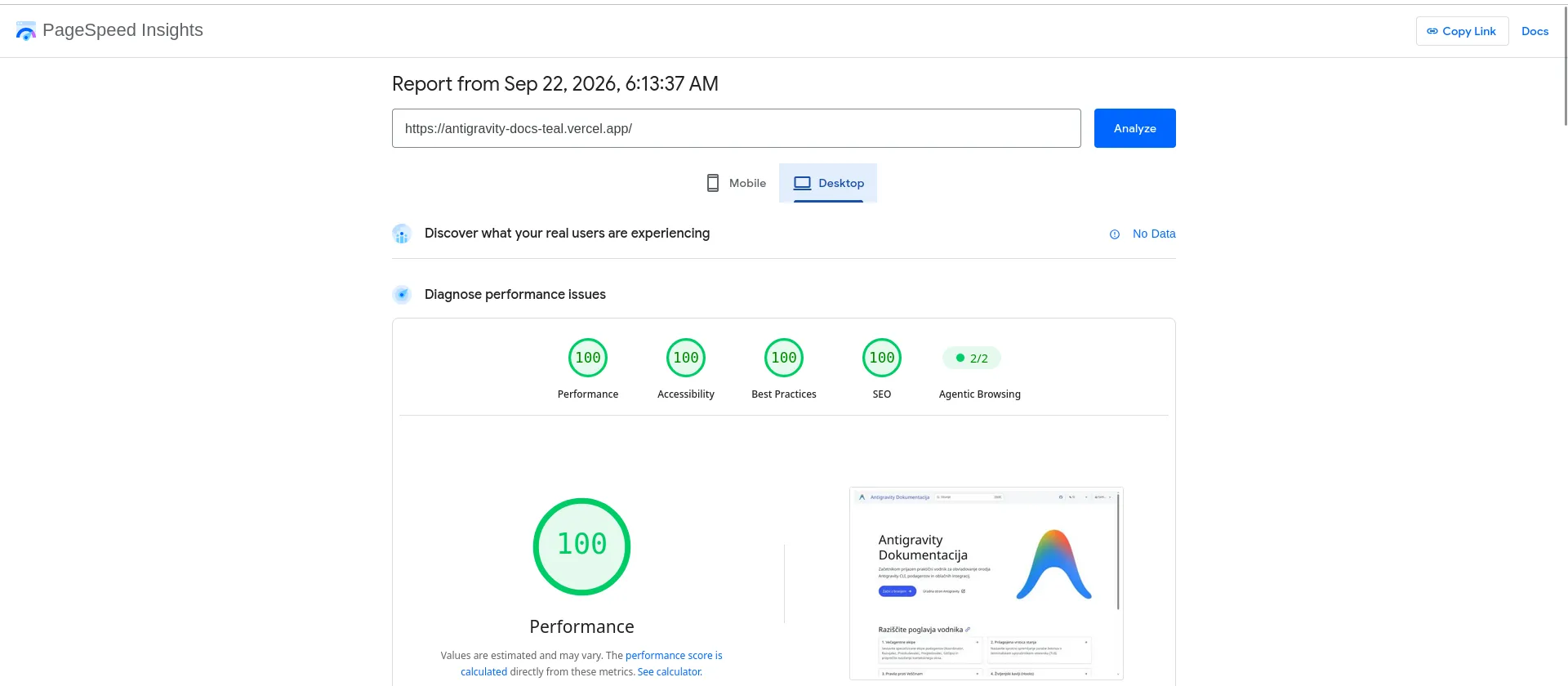
- Performance: 100 — Near-instant Largest Contentful Paint (LCP) and zero blocking time due to Astro’s zero-JavaScript static HTML default.
- Accessibility: 100 — Built-in accessible color contrast, compliant ARIA attributes, and keyboard-navigable menus provided by Starlight.
- Best Practices: 100 — Automatic modern image compression (Sharp
.webp), HTTPS enforcement, and zero console errors or deprecated APIs. - SEO: 100 — Automated metadata tags, structured sitemaps, semantic headings, and multilingual alternate links (
hreflang). - Agentic Browsing: 2/2 — Clean, semantic HTML structure perfectly parseable by AI agents and automated crawlers.
Conclusion
Section titled “Conclusion”You now have a fully operational, multilingual Astro Starlight documentation portal hosted on Vercel. The site includes automatic image compression, full-text client-side search across all languages, customizable CSS layout ordering, and instant automated production deployment.
Next Steps & Resources: